LCFW 6.20/6.35/6.39/6.60 Pro B9 Released
Posted by dimy93 August 25, 2011
Categories: PSP Custom Firmware, PSP News
62 Comments
What is LCFW ? LCFW a.k.a Light Custom Firmware is a custom firmware that is stored in the RAM as well as in the Flash0 and when the PSP is completely turned off it gets erased(only from the RAM). It’s the only CFW available for PSP 3000/GO/E1000 and PSP 2000 with TA088v3. It enables you to play PS1 games, PSP iso/cso games and to run homebrews and plugins.
Is there a way to make this LCFW permanent? If your PSP supports 6.20 OFW there is so called Permanent Patch that can make the 6.20 Pro b9 permanent and it’s supported by any PSP that supports 6.20 OFW. If you have PSP 1000 or PSP 2000 with non-TA088v3 motherboard you can also install 6.39 Pro B9 or 6.60 Pro B9 and install CIPL. This will make the LCFW full CFW.
What is Fast Recovery? After the initial installation of the LCFW there is easier way to turn it on. It’s to run the Fast Recovery.
Can I delete the files after the installation? If you have installed 6.20 Pro B9 with a permanent patch or CIPL you can delete everything. If not than you can delete everything except the Fast Recovery.
What PSPs are supported?
6.20 Pro B9 – 1g,2g,3g,4g,5g,6g
6.35 Pro B9 – 1g,2g,3g,4g,5g,6g,7g,9g
6.39 Pro B9 – 1g,2g,3g,4g,5g,6g,7g,9g
6.60 Pro B9 - 1g,2g,3g,4g,5g,6g,7g,9g,11g a.k.a PSP E1000( not yet tested )
I installed 6.20 Permanent Patch and got a file called vshorig.prx. What to do it? This is file that will help you if something with your PSP went wrong. Copy it somewhere save – on your computer for example.
So How to install 6.XX Pro B9:
Install the some of these OFW : 6.20,6.35,6.39,6.60 ( No matter if you downgrade or upgrade or you are on one of them already )
Download the version of the LCFW that corresponds to your OFW
Unrar both FastRecovery and PROUPDATE folders in PSP/GAME
Run the 6.XX PRO UPDATE Icon from Game – Memory Stick
You will see black screen like the one below. Hit the X button. When the installation completes hit the X button again.
You are now back to the menu with 6.XX Pro B9 installed.
How to install 6.20 Permanent Patch( This works only on 6.20 Pro B9 already installed and enabled) :
In the 6.20 Pro B9 archive you will find folder called “620PRO_Permanent”. Copy it in PSP/GAME
Run it from Game – Memory Stick on your PSP.( See below )
You will see a black screen. Press X on it. Then you will be asked if you want to test the patch. Press X again. ( See below )
If your PSP doesn’t crash and goes to the XMB you can proceed with the installation. Otherwise your PSP is not compatible with it and should stop trying to install it.
Run the permanent patch again. Hit X again on the first question but this time hit O on the second.
Your 6.20 Pro B9 is now permanent. You Will find out that you got a file vshorig.prx in your root directory of the PSP. Copy it somewhere save – for example on your computer. It can help in some cases of brick.
Installing 6.39/6.60 CIPL( This must be installed on 6.39/6.60 Pro B9 and only on PSP 1000 and PSP 2000 with non -TA088v3 motherboard. Otherwise this will cause a brick that can not be fixed.) :
You will find a CIPL_Flasher folder in the 6.39/6.60 Pro B9 archives. Place it in PSP/GAME
Run it from Game – Memory Stick ( See Below ).
You will see a black screen as the one below. Hit X and wait the psp to reboot.
You now have a permanent 6.39/6.60 PRO B9.
Last but not least here is the changelog :
Some bugfixes and code optimization
Support for PSP Go Video mount
Fixed a bug in Inferno/SonyNP9660 when enter sleep mode
Updated decryption component, 6.20/6.3x add future support for encryption type PRX version 6.60
Added compatibility to future game requiring 6.60fw
Added 6.60 version (theorically sopports 11g module)
Added option 166/83 frequency of CPU
Download 6.60 pro nightly (9) [others are unavaillable due to CIPL Flasher]
Friday, August 26, 2011

Wednesday, August 10, 2011
PSP GAMEBOOTS
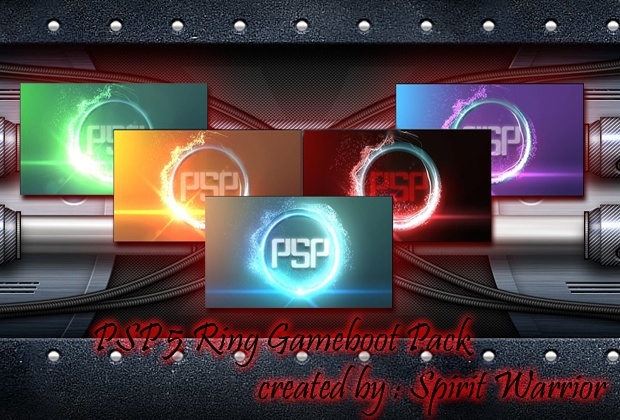
The gameboot is the video that appears when you enter a game (by default bubbles sony) But that can change it without risk of brick 100% secure.Just follow the steps of how to install that comes with the download.
All projects have been created with After Effects, have a particular sound and are HD
PSP Blue Ring Gameboot

- PSP Green Ring Gameboot
- PSP Orange Ring Gameboot
- PSP Red Ring Gameboot
- PSP Violet Ring Gameboot
Monday, August 8, 2011
6.39 Pro Nightly (B9) Beta For all psp Models !!
Description
PSP CFW 6.39 PRO-B9 Beta has just been release to the homebrew community . PSP CFW 6.39 PRO-B9 Beta is the latest PSP CFW 6.39 to be release by PSP Developer ColdBird and Pro Firmware Developer team who has decided to release a beta version of their popular CFW known as PSP CFW 6.39 PRO-B9 Beta to the homebrew community . This is a beta release , So some features and stability might be buggy , But this is expected from a beta version , However, If you are currenlty using PSP CFW 6.39 PRO-B8 without any issue, Then is recommended not to update to the latest version which is now PSP CFW 6.39 PRO-B9 Beta release as a beta . However, if you will like to test PRO Firmware Team New Custom Firmware , Then feel free to download PSP CFW 6.39 PRO-B9 Beta via our download section below . Don’t forget to read the developer statement for more information about PSP CFW 6.39 PRO-B9 Beta and it’s features .Remember that installing any PSP Custom Firmware into your PSP will void your warranty . So be careful and make sure to follow all instruction to avoid any issue during the installation of PSP CFW 6.39

Thursday, April 28, 2011
PSP Custom Firmware 6.20 Permanent & 6.35 PRO-B5 Update
Coldbird & The Team, have updated the PRO-B5 releases. Seems yesterday’s release had a PSX error “The game could not be started (FFFFFFFF)”, black screens and 6.35 install issues. Our 6.20 PRO-B5 and 6.35 PRO-B5 downloads below have been updated. Please re-download your chosen PRO-B5 CFW to fix any issues…
Liquidzigong aka Virtuous flame and Coldbird have released their PRO-B5 custom firmware for Firmware 6.20 and 6.35. This release has a big list changes and the features of this firmware are listed below. Install this from either OFW 6.20 or 6.35. Or upgrade from PRO-B4 6.20 Perm. Above there is a quick preview video below which shows you some of the features andsettings
PRO-B5 UPDATE -- Changelog
* [!]Fixed freeze on Patapon with Inferno
* [!]Fixed version.txt with Windows LRCF
* [!]Fixed USB charge
* [!]Fixed crash in recovery menu
* [!]Fixed compression support with updater
* [!]Fixed syscall execution, thanks to neur0n
* [!]fixed plugin load code, now ms0 and ef0 goes independently
* [!]fixed crash on system version display
* [!]alter default settings for some noobs
* [+]added patch in umd4homebrew, thanks to ardi
* [+]added DJMAX3 anti-CFW patch
* [+]PSN PSX game now support custom manual
* [+]added kuBridge functions and example
* [+]added /ISO in htmlviewer downloadFeatures:* Dump UMD Images to ISO
* Dump PSN-Bought Titles to ISO (using NPDecryptor)
* UMD-4-Homebrew Support (Thanks to ardi)
* CFW Folder Hider (fixes DJ Max Portable 3 and possibly other titles)
* Dump PSN-Classic Decryption Keys
* version.txt FW-Revision Fake Support
* Supports new firmware Titles
* PSN Support
* ISO / CSO Playback Support
* PSN Classic Sharing Support (Decryption Keydump required)
* Custom PSX EBOOT Playback Support
* Permanent Bootloader Support (on 6.20 version)
* Recovery Menu Support
* XMB Satellite Support
* Overclocking Support (including WLAN fix)
* High Memory Unlock Support (for 2g+ models, including 5g pause game fix)
* Plugin Support
* NID Resolving Support (1.XX, 3.XX, 5.XX, 6.XX)
* Homebrew Playback Support
* Multiple ISO Drivers (M33, Inferno, NP9660)
* Registry Hack Support (Unlock WMA, Unlock Flash Player, X/O Button Swap)
* PRO NoDRM Engine (use decrypted DLCs for your games)
* 5g IoPath Fixer (to improve compatiblity to old plugins on PSP Go)
* Region Fake Support
* MAC Address Hider
* Gameboot Skip Support
* Bootlogo Skip Support
* USB FlashProtect Support
* EBOOT Picture Hider (decreases loading time of EBOOT thumbnails)
* 5g Savestate Anti-Delete Feature (prevents savegame deletion on game resume on PSP Go)
* USB Battery Charging Support (for 2g+ models)
* Custom HTML Viewer Save Locations (/ISO)
* Extended KUBridge for Developers (Kernel Range Peek / Poke Support)
Video
6.20 Pro B 5 Download
Click To download
6.20 Pro B 5 Download
6.35 Pro B 5 Download
Breaking News:-
6.20 & 6.35 Pro C Is 60% Complete For More Information Visit Colfbrid.co.cc
& For latest Pro Update visit pro.colfbrid.co.cc
Sunday, March 6, 2011
6.35 PRO TO 6.37 me-5 Without update ofw. (PSP 2000)
First, you need to install 6.35 PRO-B
1. copy UPDATE folder at ms0:/PSP/GAME/.
2. Put 6.37 official update at ms0:/PSP/GAME/UPDATE/637.PBP .
3. Run installer from xmb.
2. Put 6.37 official update at ms0:/PSP/GAME/UPDATE/637.PBP .
3. Run installer from xmb.
– features –
Hold R trigger and turn on the psp, you can enter recovery menu.
Hold Home button and turn on the psp, you can Boot OFW !!!!!!!
Hold R trigger and turn on the psp, you can enter recovery menu.
Hold Home button and turn on the psp, you can Boot OFW !!!!!!!
Add OPNSSMP option. Now you can run ISO without decrypt EBOOT.bin ,if ISO’s required FW is lower than 6.37.
You can set this option at “RecoveryMenu -> Advanced -> Advanced Config -> Excute OPNSSMP.bin” .
You can set this option at “RecoveryMenu -> Advanced -> Advanced Config -> Excute OPNSSMP.bin” .
Prometheus ISO Loader(PIL) seemed not support 6.37 . If you use PIL, need decrypt EBOOT.BIN .

Download section: Click on image!!!
If u updated to 6.37 & Want 6.35 so download it
Downgrader for FW 6.31/6.35/6.37 to Firmware 6.20 R1(non-psp go)
Official PSP Firmware 6.35/37 for PSP Go
Game Categories Light for 6.35 PRO and 6.37 ME - 3 Custom Firmware

Neur0n has updated the popular Game Categories plug-in by Bubbletune to support his 6.35 PRO and 6.37 MEfirmwares. He has also included the source code.
Game Categories Light features:
- Adds a new option called ‘By Category’ to your ‘Group Content’ menu.
- Adds the ‘By Category’ option in the Square-button cycling.
- Defaults to the ‘By Category’ option when you load the menu.
- Introduces a subtitle that shows the game type and firmware limits.
TO EDIT A title MAKE A NEW FOLDER IN GAME & PASTE INSIDE A HOME BREW
Ex:- X:/psp/game/homebrew/(gamename)/eboot.pbp

CLICK HERE TO DOWNLOAD
Plugins

Daedalus Version 64 Beta 3
some massive changes here as the Nintendo 64 emulator jumps to Beta 3. Many top dev’s have been working hard on this latest release. So many improvements, just to many to list. Expect many games to run much smoother, better visuals and just overall awesomeness. Just watch how playable Zelda is in the below video.
DaedalusX64 Beta 3 changelog: (Its a big one..)
DaedalusX64 Beta 3 -- 25 February 2011
(Major changes since Beta 2 Update, See SVN log for full list)
———————-
Corn:
Screen zoom (up to 150%) to get rid of black borders
Show patch progress instead of black screen while patching (Corn/Salvy)
Optimization/Speed-up in Dynarec/Loop Opt. and simplified the Fragment Cache Hash
Z-fighting Fixed
Faster D-list processing for a speed-up
Faster N64 Fixed Point Matrix loading and other optimizations in rendering
Added option to use Cover-Flow or Classic GUI
Added battery info in pause menu (Salvy/psppwner300/Corn)
64 SaveState slots (psppwner300/Corn)
New faster Double Display List processing
16bit screen rendering (Using dithering for smoother colors)
Missing HUD(heart) fixed in OoT/MM
Faster texture check/hash
Faster audio conversion code and optimizations, fixed left/right sound swap
New DMA transfer mode using VFPU
Frame-rate limiter no longer stalls CPU
Added more patches in OSHLE GU function library using VFPU
Added Auto Frame Skip 1 & 2
Added hacks for Wonder Project J2, SM64 stars blend, Kirby 64 in DLParser_S2DEX_Bg1cyc & copy
Hack for alternative TLUT (MM, SSV, Animal Crossing, Sin and Punishment(Tsumi to Batsu) & FlyingDragon)
Hack for Wipeout, F-Zero and RR64 to proper Z-buffer rendering of geometry
When N64 uses Average as texture filter we do Bi-linear on PSP (Smooths Gex 3 and others textures properly)
Fixed Model-view matrices for Gex games to render properly
Added Blend Explorer now takes a selection from Combiner Explorer to test blends in real-time
Set Prim Depth works -> SSV, Road Rash, Glover, Rayman 2, Donald Duck
Insert Matrix works -> Kirby enemies and SSB animation
Force Matrix works -> Tarzan, Donald duck, Rayman2 and Star Wars Episode I -- Racer
Proper texture loading -> F-Zero, Flying dragon (menus)Salvy:
New home button library (works on newer FW’s 6XX + button wrapper for easy usage)
New blender using a 16bit hash
Generic blend-mode (handles over 70% of all inexact blends)
Reworked COP1 Unusable Exceptions ( Increased compatibility greatly )
Added support for uCode tables and uCode definitions
Added a more robust and faster uCode cache (All used uCodes are retained, to avoid unnecessary hashing)
Reworked uCode detection (faster, and fixed several annoying bugs)
Simplified greatly interrupts
Implemented AI OS functions, also several fixes and optimizations throughout OSHLE
Updated Audio code base to latest Azimer’s plug-in (Salvy/Corn)
Implemented several custom uCodes (Conker, GE sky etc)
Recursive deletion + Reset settings/oshle cache
Deprecated RSP LLE emulation from PSP build
Properly transfer palettes to Video Memory after loading texture (Fixes annoying spots)
Added Forced Filtering, can be changed on Global Settings (Salvy and Kreationz)
Fixed memory region 0xA500 0xA5FF (Pokemon Stadium 1 and F-Zero(U) boot now)
Panic Button -> L-TRIG + R-TRIG + START pressed for 2 sec (Salvy/Corn)
Add compatibility for using gprof for profilingKreationz:
Update Screen only called once per frame (Fixes Flashing and Shaking)
Updated clipping code to latest version from Irrlicht Engine
Fix of IA4 textures (OoT’s Trees for example)
Fixed 4bpp texture paddingGrazz:
Implemented S2dex and Sprite2D
Auto uCode detector (Grazz/Kreationz)
Implement per game SaveState supportHoward0su:
Memory Access Optimization
Move Video Memory and Graphics Context initialization into system.cpp
Avoid strdup, use static array insteadOther Devs and People that helped greatly:
Added VFPU math (Zack/Corn)
Several improvements in our makefile (Maxijac)
Allows SaveState deletion (Maxijac)
Various improvements/updates to roms.ini (Wally, bdacanay, Yamagushi and Destroyer5150)
Cover-Flow Gui (Yamagushi)
Recommended Settings (Yamagushi)
Several custom blend-modes (Wally, Salvy, Kreationz, Corn, bdacanay, Darth_Sidious and NintendoBoy13)
Added ability to delete ROMs to GUI (psppwner300, Corn)

CLICK TO DOWNLOAD
Subscribe to:
Posts (Atom)